
Open beta · Local-first desktop app
Chat with your characters, on your own machine
Rin Chat is a free desktop app for roleplay and creative writing. Load a character card, connect any OpenAI-compatible provider with your own API key, and write. Your cards, chats and settings stay on your computer, encrypted at rest, with no cloud account required.
Free, with every feature unlocked — no trial, no account, nothing locked behind a payment. You bring an API key from the AI provider of your choice and pay them directly.
This is an open beta
Rin Chat is under active development and ships often. Expect rough edges and the occasional bug. Your data is encrypted and stored locally, and the app can export a full backup — take one regularly. Bug reports and feature requests genuinely shape what gets built next.
Current build: 0.5.7
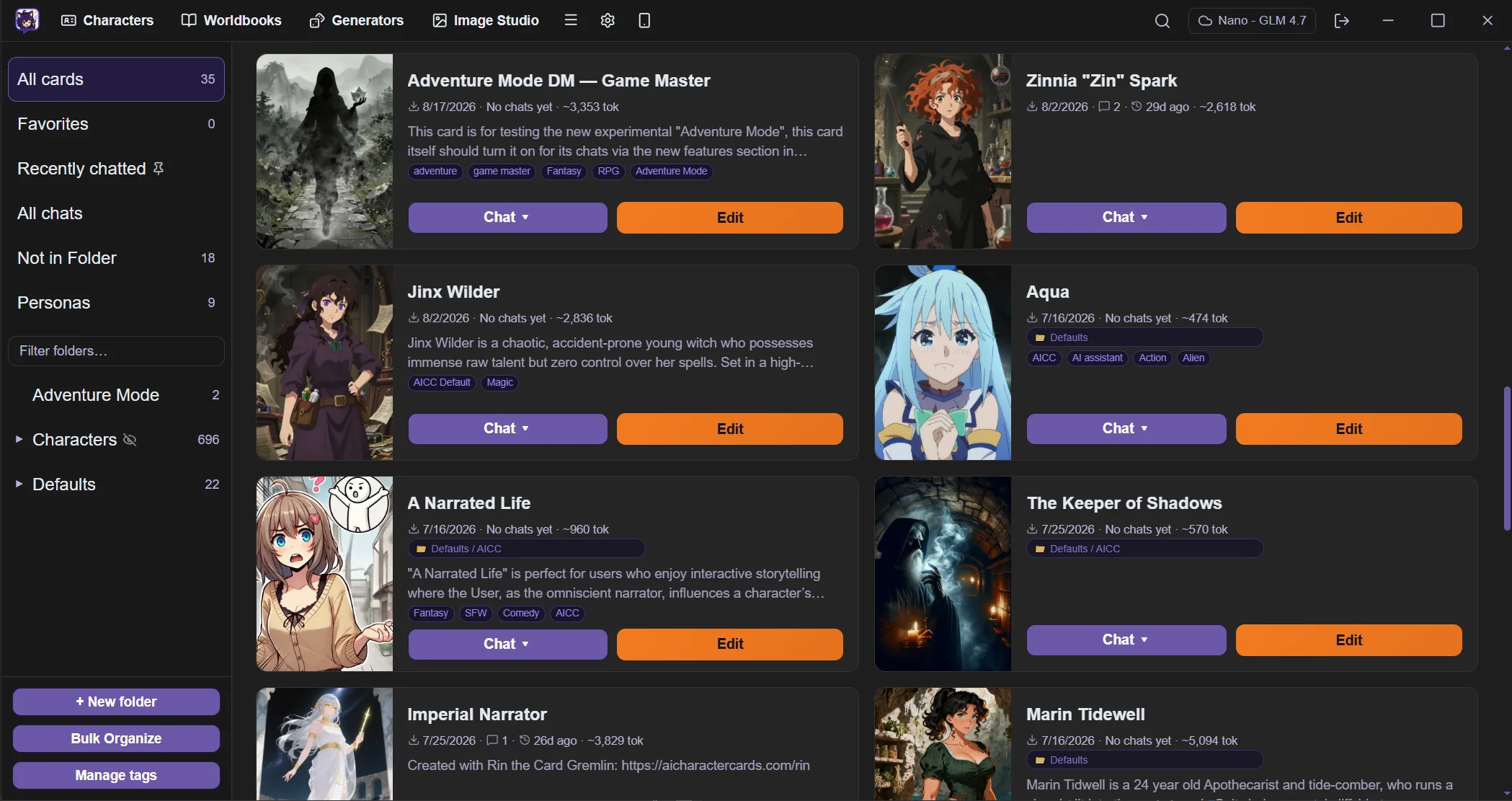
Highlights
Local first
Your characters and chats live on your own machine. The app works without cloud sync.
Encrypted on device
Data is stored with AES-256-GCM encryption. The key is wrapped by your operating system keychain.
Any provider, your key
Connect any OpenAI-compatible endpoint with your own API key. You pick the service and the model, and you pay them directly.
Built for long stories
Lorebooks, memory summaries, an Author's Note and context budgeting keep a long chat coherent.
Install it. That is the whole setup.
Roleplay tools this capable usually ask you to install a runtime, clone a repository and keep it patched by hand. Rin Chat is an ordinary desktop application. There is no setup ritual, and no point where you are expected to read an error log.
No command line, ever
You never open a terminal — not to install it, not to update it, not to fix it when something changes.
No dependencies to chase
Nothing to install beforehand. No runtimes to match, no package manager, no version conflicts to untangle.
One installer
Download a single file and run it. The app is ready when it finishes.
Updates arrive on their own
New versions install themselves from inside the app. No re-downloading, no manual migration steps, no rebuilding.
An interface, not a control panel
Real windows, menus and settings screens that behave the way desktop software is supposed to. Everything is where you would look for it.
Private by default
Your library is encrypted on disk and never uploaded. Prompts go to the provider you picked, and nowhere else.
How it works
Install the app
Download Rin Chat and run it. Everything works on the desktop, with no browser tab.
Connect a provider
Paste an API key from any OpenAI-compatible provider. You choose the service and the model, and you pay that provider directly.
Load a card and write
Import a character card or build one in the editor, then start the chat.
What is inside
Rin Chat covers the whole loop: the card and the library around it, the chat and its cast, the prompt that reaches the model, and the encrypted store underneath.
Character cards
Bring in the cards you already have, edit every field, and keep a large library in order.
Import existing cards · A card format that does not trap you · Forward and backward compatible · Nothing is lost on the way in
Chat
A writing surface built for iteration, not a single take.
Several chats at once · Streaming replies · Swipes and regenerate · Edit, delete and branch
Casts and personas
Decide who is in the scene, including you.
Group chats · Per-member settings · The model picks the speaker · Auto mode
World building
Background detail that reaches the model when it is relevant, and not before.
Lorebook editor · Standalone worldbooks · Lorebook tester · Macros
Adventure mode
Light game mechanics inside an ordinary chat, for cards that ask for them. The model plays game master and the app is the referee — it rolls the dice and keeps the numbers honest.
The app referees, not the model · Choices and rolls as buttons · A character sheet that keeps itself · Costs that are real
Prompting and memory
The controls that decide what the model receives, and what it still knows fifty messages later.
System prompt presets · Author's Note · Context budgeting · Summary and memory
Models and providers
Bring your own endpoint, and control how it decodes.
Any OpenAI-compatible provider · Model picker · Sampler settings · Reasoning controls
AI helpers
Optional assists that run on the provider you already selected.
Suggested replies · Rewrite a section · Chat titles · Story director
Card Forge
Guided character creation for when you have an idea but not a card. Talk it through with a guide, then turn the conversation into a finished card.
Brainstorm, then generate · Guides with their own voice · Edit by asking · It lands in your library
Remote access
Turn the app into a small server and carry the chat to your phone or another computer — on your own network at home, or through your own VPN when you are not, without your library ever leaving the desktop.
Your phone as a second screen · Nothing leaves the machine · Your network, or your VPN · PIN protected
The app itself
Desktop software you can shape to suit you — including a full theme editor, not just a dark mode switch.
In your language · Light and dark, then your own · Your own backgrounds · Colour-coded prose
Privacy and your data
Your library stays on your machine, encrypted, and you hold the keys to it.
AES-256-GCM encryption · Encrypted index · Unlock on your device · Recovery kit
Common questions
- What is Rin Chat?
- A desktop app for roleplay and creative writing. You load a character card, connect an AI provider, and write. It runs on your own machine rather than in a browser tab on someone else's server.
- What does it cost?
- The app is free, with every feature unlocked — no trial, no account, nothing behind a payment. You need an API key from an AI provider to generate replies, and you pay that provider directly for what you use.
- What does “beta” mean here?
- The app is complete enough to use every day, but it ships often and some things are still rough. Expect the occasional bug and frequent updates. Take a backup now and then, and tell us what breaks — it is the fastest way to get it fixed.
- What languages is the app available in?
- The interface is available in English, Simplified Chinese, Japanese, Spanish and German, and you can switch between them in settings. This covers the app itself — the language your characters write in is up to your cards and the model you use.
- Which platforms are supported?
- Windows 10/11 64-bit, and 64-bit x86 Linux as an AppImage or a .deb package. macOS is not released yet.
- Which AI providers can I use?
- Any OpenAI-compatible endpoint. You paste your own key, choose your own model, and can switch provider whenever you like — you are not tied to one service.
- Can I use the character cards I already have?
- Yes. Rin Chat imports common character card formats, including cards embedded in a PNG image, and you can import a whole folder at once.
- Do my chats leave my computer?
- Your library is stored on your device and encrypted at rest. Prompts go only to the AI provider you selected — nothing is uploaded to us.
- Can I move my data to another computer?
- Yes. Export a full encrypted backup, then restore it on the other machine.